How to Look Up an LLC in New Mexico (2026)

To look up an LLC in New Mexico, search the Secretary of State's SOS Enterprise business search. Search by entity name, Business ID number or registered agent. Searching costs nothing and doesn't need an account, and each result lists the entity type and its current status.
Four search methods, a trademark check and a direct contact line for the Business Services Division are all covered below. Start wherever fits what you already know.
Quick Summary
- New Mexico assigns each LLC a Business ID number. Use it for a fast, exact lookup once you have it.
- Small businesses make up 99.0% of New Mexico businesses, per the SBA [1]. Confirm your name is free before you file.
- Reach the Business Services Division toll-free at 1-800-477-3632 if the search tool doesn't answer your question.
| Search Method | What to Enter | Best For |
|---|---|---|
| By entity name | The business name, in Basic or Advanced search | General lookups when you only know the name |
| By Business ID | The entity's Business ID number, once you have it | Confirming a specific, already-known entity |
| By registered agent | The agent's name, in Advanced search | Finding entities tied to a known agent |
| By name availability | The name you're considering for a new LLC | Checking whether a name is open before you file |
How to Search for an LLC in New Mexico
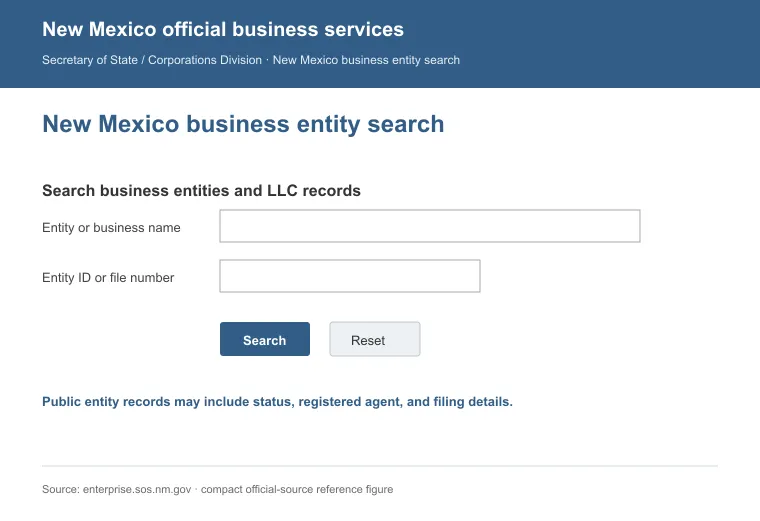
The Business Services Division runs New Mexico's SOS Enterprise search. All the search methods below start on that same portal.
1. Search by Entity Name
Type the business name into the search bar. The portal needs at least two letters or numbers to run a search.
To run the search, do the following:
- Go to the SOS Enterprise Business Search page.
- Choose Basic search, or switch to Advanced for more filters.
- In Advanced mode, pick Contains, Starts With or Name Availability.
- Click Search, then open a result.
- Each result shows the entity name, Business ID, entity type, entity subtype, formation date and legal status.
2. Search by Business ID
If you already have the entity's Business ID, entering it skips the name-matching step entirely. New Mexico assigns a Business ID to every domestic and foreign LLC, and a Business ID search returns the same six result fields as a name search.
3. Search by Registered Agent
Enter an agent's name in the Advanced search to find the entities tied to that agent. This helps when you know who represents a business but not its exact name.
4. Check Name Availability
Choose the Name Availability option, then type the name you're considering. Check availability here before you spend money on a formal name reservation.
Contact the Business Services Division
The Business Services Division takes questions the search tool can't answer, by phone or email:
- Phone: 505-827-3600
- Toll-free: 1-800-477-3632
- Email: [email protected]
- Hours: Monday through Friday, 8:00 a.m. to 5:00 p.m.
New Mexico's Business Services Division states that all business filings have moved to the online process through the Enterprise portal, so plan to file there instead of by mail.
Certificates and Copies
New Mexico charges $25 for a certificate for any purpose not otherwise specified. A certified copy runs $1 per page, with a $10 minimum, plus a $25 certification fee. Reserving a name ahead of filing costs $20 and holds it for 120 days [2].
How to Check If a Business Name Is Trademarked in New Mexico
A clean New Mexico entity-name search isn't the same as a clear trademark. Run both checks before you settle on a name, since skipping either one can mean picking a name you later have to change.
Here's how to run each check:
Federal Trademark Check (USPTO)
Search the Trademark Electronic Search System (TESS), run by the U.S. Patent and Trademark Office. A New Mexico-only search won't catch marks registered elsewhere.
State Trademark Check
New Mexico runs its own Trademark Database through the Secretary of State. Search it before you file a state trademark application.
It flags only New Mexico-registered marks, so pair it with the federal check above before you commit to a name.
Reasons to Perform a New Mexico LLC Search
Performing an LLC lookup in New Mexico is useful for more than checking a name:
- Cross-check an agent's name against the entities they represent when you're comparing the best registered agent services in New Mexico.
- Check that a business shows Active status before you sign a contract or move forward with a partnership.
- A Business ID from a filing or application is only as strong as its match in the state's own records, so confirm it here first.
Looking up an LLC in New Mexico takes a few minutes on the SOS Enterprise portal. Call 505-827-3600 for anything the search tool can't answer.
FAQs
Can I Search a New Mexico LLC by Its Registered Agent?
Yes, you can search a New Mexico LLC by its registered agent name instead of the business name. This helps when you want to see how many entities one agent represents, for example while comparing registered agent services.
How Much Does It Cost to Use the New Mexico Business Search?
There's no cost to use the New Mexico Business Search on the SOS Enterprise portal. You only pay a fee if you order a certificate or a certified copy.
What's the Process to Reserve an LLC Name in New Mexico?
Reserve an LLC name in New Mexico by filing a name reservation application with the Secretary of State and paying the $20 fee. The reservation locks in the name for 120 days, giving you time to finish your formation paperwork.
Is a New Mexico LLC Required to File an Annual Report?
No, an LLC in New Mexico isn't required to file an annual report. It just needs to keep a current registered agent on file and pay any required filing fees to stay in good standing.
References:
- https://advocacy.sba.gov/wp-content/uploads/2025/06/New_Mexico_2025-State-Profile.pdf
- https://law.justia.com/codes/new-mexico/chapter-53/article-19/