How to Look Up an LLC in Rhode Island (2026)

To look up an LLC in Rhode Island, run a name search through the state's Corporate Database. Enter the company name, then open the matching record to see its status, agent and filing history.
A trademark check is a separate step, and it's worth doing before you settle on a name. This guide covers both searches, plus what to do when the online tool doesn't answer your question.
Quick Summary
- A single Rhode Island Corporate Database search confirms whether an LLC is active and who can be served on its behalf, no account needed.
- Rhode Island counts nearly 110,000 small businesses, reason enough to confirm your name is free before you commit to it [1].
- Search for your LLC name before you form a new Rhode Island LLC.
| Method | What to Enter | Best For |
|---|---|---|
| Name Search | Business name (full or partial) | Confirming an LLC is on file and pulling its record |
| Individual Name Search | Officer or director name | Finding entities tied to a specific person |
| Identification/Filing Number | 9-digit ID or 12-digit filing number | Looking up a specific record you already have a number for |
| Agent Search | Registered agent name | Finding entities served by a known agent |
| RI Trademark Search | Trademark or registrant name | Checking for a conflicting Rhode Island trademark |
How to Search for an LLC in Rhode Island
The most reliable way to search for an LLC in Rhode Island is a name search in the Corporate Database on the Department of State's website. The tool searches active and inactive businesses registered with the state.
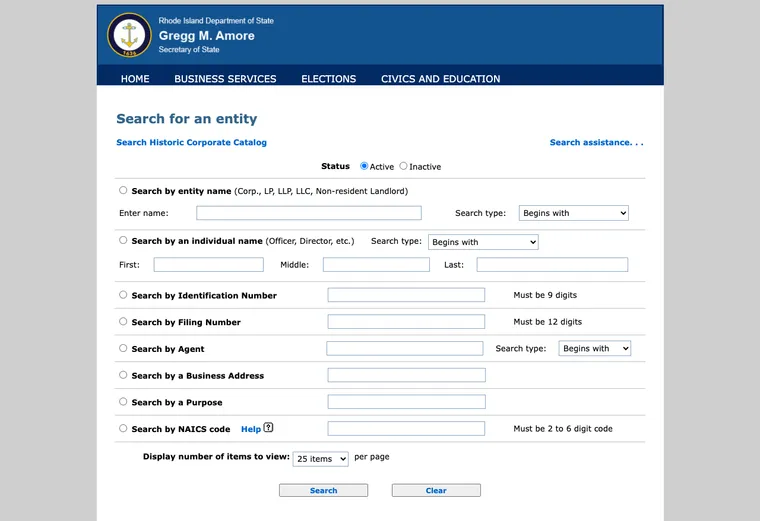
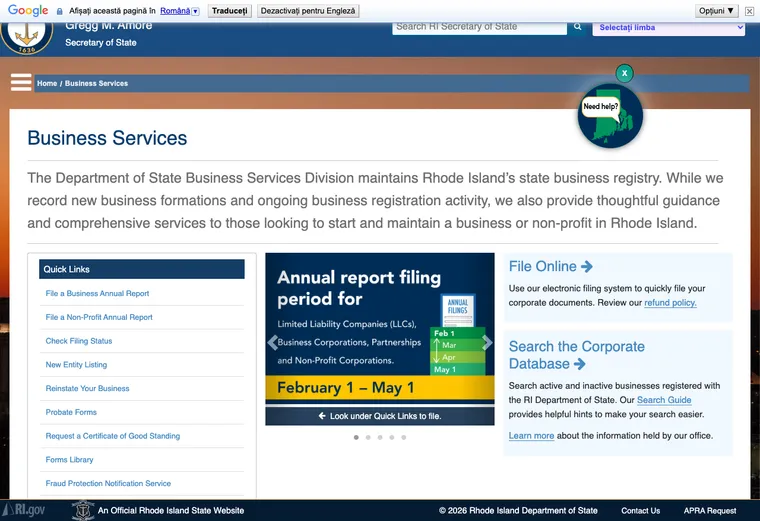
1. Search the RI Corporate Database
Here's how to run a search:
- Open the Corporate Database.
- Pick a search type and enter the matching detail.
- Click "Search" to run the query.
- Open the matching entity to view its filing record.
The database offers several search options:
a. Name Search
This is the default search field. Filters narrow the match to Begins with, Exact match, Full text or Soundex, so try more than one filter if the first pass turns up nothing.
b. Individual Name Search
Enter an officer's or director's name instead of the company name when that's the detail you have on hand. The database applies the same four match filters here as it does on the name search.
c. Other Ways to Narrow the Search
A few more filters cover the cases the name fields don't:
- Identification Number. A 9-digit identification number works when you don't have the exact company name to search by.
- Filing Number. A 12-digit filing number is another way in, if that's the detail you have on hand instead.
- Agent. Search by the name of the Rhode Island registered agent when you know it. This filter accepts Begins with or Contains.
- Business Address. A physical address narrows results to businesses registered at that location.
- Purpose. Entities that list a specific purpose in their filing turn up through this filter.
- NAICS Code. A 2 to 6-digit code filters results down to a single industry.
2. Call the State
Calling the Business Services Division at 401-222-3040 helps with a question the online search can't resolve. The office is open Monday through Friday, 8:30 a.m. to 4:30 p.m.
3. Send an Email
Emailing [email protected] works well for a question that needs a written answer or a document the website doesn't provide, and it reaches the same Business Services Division you'd reach by phone.
4. Other Ways to Check a Business
A few sources outside the state's own database add context:
- Social media. An active business profile shows how a company presents itself and how customers respond.
- A general web search. News coverage and press mentions round out what the state record shows.
- Business directories. Yelp and the Better Business Bureau carry customer reviews tied to a specific business.
- The local chamber of commerce. Chapters often keep their own member records.
- Industry-specific databases. Some trades keep licensing or membership rosters worth checking too.
How to Check If a Business Name Is Trademarked in Rhode Island
To check if a business name is trademarked in Rhode Island, search the RI Trademark Search on the Department of State's website. A registered trademark elsewhere won't block your LLC filing, but it can still trigger a dispute later, so it's worth checking before you settle on a name.
Here's how:
- Open the RI Trademark Search page.
- Choose Registration No., Trademark/Servicemark, Mark description or Registrant as the search field.
- Enter the matching detail for whichever field you picked.
- Set the match type to Contains anywhere or Begins with.
- Add a date range if you want to narrow by filing date.
- Pick a transaction type, like Registration or Renewal, if it helps.
- Choose how many results to show per page.
- Click Search and review the matches.
Reasons to Search for a Business Entity
Searching a business entity pays off in more situations than picking a name. Common reasons include:
- Confirming an LLC is legally registered and in good standing.
- Checking a potential business partner or competitor.
- Doing due diligence before an investment or a purchase.
- Confirming a company is legitimate before you buy from it.
- Researching a business's history and background.
- Making sure your own LLC name isn't already taken.
How to Reserve a Business Name in Rhode Island
Once the Corporate Database search confirms your name is free, you can hold it before anyone else files it. That step matters most when you're still lining up paperwork or funding and aren't ready to submit your formation documents yet.
Rhode Island reserves a business name for 120 days through Form 620, the Application for Reservation of Entity Name, filed with the Department of State for a $50 fee [2]. File it online or by mail.
Reserving a name is optional. If you're ready to form your LLC now, filing your Articles of Organization ($150 fee) claims the name at the same time, so the extra step isn't necessary.
FAQs
Can I Find Out Who Owns an LLC in Rhode Island?
No. Rhode Island doesn't record who owns an LLC as part of its public filing. The Articles of Organization name a registered agent and an address, not members or partners, and ownership stays private with the entity.
How Up to Date Is the Rhode Island LLC Search Database?
Rhode Island's Department of State doesn't publish a set update schedule for the Corporate Database. Call 401-222-3040 to confirm a specific record before you rely on it.
Is There a Fee to Search for a Rhode Island LLC?
No. A Rhode Island LLC search through the Corporate Database costs nothing and needs no account. You only pay once you reserve a name or file paperwork.
How Much Does It Cost to Reserve a Name in Rhode Island?
Reserving a name in Rhode Island costs $50 and holds it for 120 days. That's useful when you want a name locked in while you finish other paperwork but aren't ready to file your Articles of Organization yet.
References:
- https://advocacy.sba.gov/wp-content/uploads/2024/11/Rhode_Island.pdf
- https://webserver.rilegislature.gov/Statutes/TITLE7/7-16/7-16-10.HTM